
Resume Parsing Errors
You applied. You optimized. You did everything right — or so you thought. The rejection email arrives (if it arrives at all), and you have no idea what happened. The problem might be invisible.
Resume parsing errors are the silent killers of job applications. They are mistakes that do not show up when you preview your PDF, do not get flagged by spellcheck, and do not look wrong to anyone who reads your resume normally. But when an ATS system tries to extract and score your resume, these errors cause the machine to misread fields, assign zero scores, or skip entire sections — eliminating you before a human ever sees your name.
This guide documents 9 real resume parsing errors — the exact technical failure each one causes, a real-world example of what it looks like, the specific fix for each, and a complete set of parsing-error-free resume examples by job title.
QUICK ANSWER — WHAT IS A RESUME PARSING ERROR?
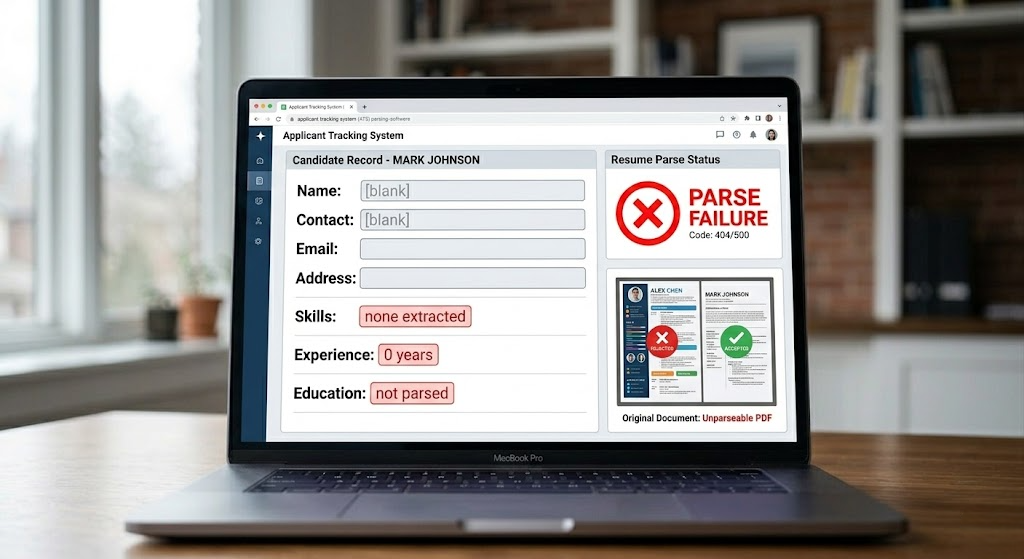
| A resume parsing error occurs when ATS software cannot correctly extract, read, or categorize your resume’s content because of a formatting, file structure, or encoding issue. The system attempts to parse your document, encounters an element it cannot process, and either assigns a zero score to that section or skips it entirely. In short: parsing errors make your resume invisible — not rejected on merit, but literally unreadable to the machine that decides whether a human ever sees it. resume parsing errors The most dangerous aspect of parsing errors is that they produce no error message you can see. Your application goes through. Your resume confirmation arrives. But your candidate record in the ATS is empty or garbled — and you never know. |
1. How ATS Parsing Actually Works — The Technical Reality
To understand why parsing errors matter so much, you need to understand what parsing actually is. ‘Parsing’ is not the same as ‘reading.’ ATS software does not read your resume the way a human does.
Parsing is the process of taking raw text from your document and organizing it into structured data fields that the ATS database can store and query. The system extracts these fields sequentially:
| ATS Parsing Stage | What It Extracts | What Goes Wrong With Parsing Errors |
| Document text extraction | Raw text content from the file | Image PDFs, text boxes, and some graphic elements produce no extractable text |
| Contact field extraction | Name, email, phone, LinkedIn, location | Icons, headers/footers, and special characters cause incorrect or missing contact fields |
| Section identification | Mapping headings to known field names | Non-standard headings fail to match — content is categorized as ‘unknown’ or lost |
| Experience field parsing | Job titles, companies, dates, responsibilities | Multi-column layouts merge text across columns; creative date formats fail pattern matching |
| Skills extraction | Technical skills, soft skills, tool names | Text boxes, tables, and graphic skill bars produce zero extractable skill content |
| Education field parsing | Degrees, institutions, graduation dates | Special characters, non-standard formatting, and creative education sections cause miscategorization |
| Keyword scoring | Matching extracted content against job description | Parsing failures in any field above reduce the total content available for keyword scoring |
For a comprehensive breakdown of the ATS evaluation process, see: What does ATS optimized mean — the complete 2026 guide.
2. Why Parsing Errors Are Worse Than a Low ATS Score
A low ATS keyword score is a content problem. You can fix it by adding keywords. A parsing error is a structural problem — it means the keywords you have worked to include are not being extracted at all.
| Low ATS Score | Parsing Error |
| ATS can read your resume — it just doesn’t find enough keywords | ATS cannot read your resume — content never reaches the scoring stage |
| Candidate record exists in ATS with accurate data | Candidate record may be empty, incomplete, or contain garbled data |
| Recruiter can search for you by name | Recruiter may not be able to find you at all depending on what failed to parse |
| Fix: add keywords from job description | Fix: rebuild resume structure to eliminate parsing failures |
| Detectable via ATS score checker (Jobscan) | Often not detectable via score checker — appears to submit correctly but produces blank fields |
This is why candidates sometimes apply to dozens of positions with an apparently well-built resume and receive zero responses — not even automated rejections. Resume Parsing Errors Their applications are being received but their candidate records are empty or garbled. resume parsing errors The ATS literally cannot find them in a search for qualified candidates.
3. The 9 Real Resume Parsing Errors — With Examples and Fixes
These are the nine most common and most damaging parsing errors documented through ATS testing in 2026. Each one is followed by a real example of what it looks like and the specific fix that resolves it.
| Parsing Error #1: Image-Based PDF — The Total Parse Failure |
| WHAT HAPPENS: When a resume is saved as an image-based PDF — through scanning a paper document, exporting from Canva, printing to PDF from InDesign, or using certain template tools — the ATS text extractor encounters a file containing pixel data, not text characters. The parser extracts zero text. Your candidate record is completely empty. Your name, email, experience, and skills are all invisible to the system. REAL EXAMPLE: Candidate exports their beautifully designed resume from Canva as PDF. It looks perfect on screen. They upload it to Workday. The ATS receives a file — but the Workday parser extracts no text from it. The candidate’s record shows: Name: [blank] | Email: [blank] | Skills: [none matched]. The recruiter searching for ‘Python developer’ never finds this candidate even though ‘Python’ appeared 6 times in the invisible PDF. THE FIX: Create your resume digitally in Microsoft Word or Google Docs. Never scan, photograph, or export from image-based design tools. Save as .docx first. If PDF is required, export using ‘Save as PDF’ from Word — this creates a text-searchable PDF. Verify by opening the PDF and selecting all text (Ctrl+A / Cmd+A) — if you can select the text, it is parseable. |
| Parsing Error #2: Multi-Column Layout — The Content Scrambler |
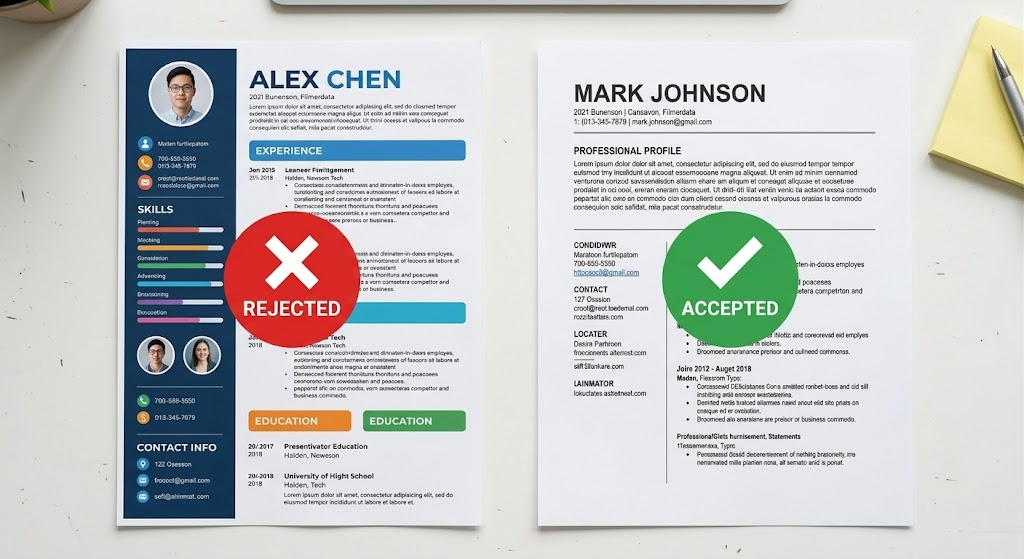
| WHAT HAPPENS: ATS parsers read documents left to right, top to bottom — like a typewriter moving across a page. When a resume uses two columns (left sidebar with contact/skills, right column with experience), the parser reads across both columns simultaneously at each vertical position. The result: your job title from the right column gets merged with your skill from the left column, producing ‘Python Developer Project Manager 2020–2023’ as a single garbled field that matches no keyword pattern. REAL EXAMPLE: A data analyst’s resume uses a two-column layout with Skills in the left sidebar and Experience in the right column. The ATS reads: ‘SQL | Jan 2020 – Data Analyst | Python | RetailMax | Tableau | Led dashboard…’ — all in a single continuous string that fails every field extraction pattern. The data analyst’s Skills section and Experience section both disappear into garbled text that scores zero against any job description. THE FIX: Convert to a strict single-column layout. All content — contact information, summary, experience, education, skills — must flow in one vertical column. Never use sidebar sections, text boxes beside content, or any layout that places content side by side. The visual appeal of two-column design costs you every ATS application where the layout fails. |
| Parsing Error #3: Text Boxes and Tables Used for Layout — The Invisible Content Error |
| WHAT HAPPENS: Text boxes and table cells are treated as isolated containers by ATS parsers. The standard text extraction process reads the main document flow and skips content that exists in separate XML containers (which is what text boxes and tables are in a .docx file). Content inside a text box — which often includes the skills section, contact information, or a summary — is simply not extracted. It is in the file but invisible to the parser. REAL EXAMPLE: A marketing manager’s resume uses a table to create a clean two-column skills layout. Left column: ‘SEO | SEM | HubSpot | Marketo.’ Right column: ‘Google Analytics | A/B Testing | CRO | Pipeline.’ The table is elegantly formatted. The ATS extracts zero skills from this candidate. Their keyword match score for a demand generation role is 0% on skills — despite having every required skill listed. They never pass the keyword threshold filter. THE FIX: Delete all text boxes. For tables used as layout elements, select the entire table, copy the content, delete the table, and paste the content as plain text in the document body. Skills sections must be plain text, separated by pipes (|) or commas. Contact information must be in the main document body — never in a text box or table cell. |
| Parsing Error #4: Contact Information in the Document Header or Footer — The Lost Identity Error |
| WHAT HAPPENS: Document headers and footers in .docx files are stored in separate XML regions from the main document body. Most ATS parsers read only the main document body and skip the header and footer regions. If you place your name, email address, phone number, or LinkedIn URL in the document header — as many templates do for a clean visual effect — the ATS may create a candidate record with no contact information. A recruiter who wants to call you cannot find your phone number. REAL EXAMPLE: A software engineer uses a template that places their name and contact information in a styled document header. Aesthetically it looks clean and professional. When the resume is submitted to Greenhouse, the parser skips the header region entirely. resume parsing errors The candidate record shows ‘Unnamed Candidate’ with no email or phone. The recruiter searches for the candidate’s name after reading their application — finds nothing. The candidate is effectively invisible in the system. Resume Parsing ErrorsTHE FIX: Move all contact information into the first 5 lines of the document body as plain text. Name in bold on line 1. City, State | Phone | Email | LinkedIn on line 2. GitHub or portfolio URL on line 3 if applicable. Never place any contact information in the document header or footer — even if it looks cleaner there. |
| Parsing Error #5: Non-Standard Section Headings — The Lost Content Error |
| WHAT HAPPENS: ATS field extraction relies on matching your section headings against a known list of recognized terms. When the parser encounters a heading, it assigns all content below it to the matching field until the next heading is found. If a heading does not match — ‘Where I’ve Been’ instead of ‘Experience,’ ‘What I Know’ instead of ‘Skills’ — the content beneath it is assigned to an ‘unknown’ field that contributes nothing to keyword scoring. REAL EXAMPLE: A graphic designer applies for a UX role. Their resume uses creative headings: ‘My Story’ (Summary), ‘Projects I’m Proud Of’ (Portfolio/Experience), ‘Tools in My Toolkit’ (Skills), ‘Where I Studied’ (Education). The Lever ATS parser recognizes none of these headings. The entire resume is categorized as unstructured text with no recognized fields. Keyword scoring produces 0% because none of the content is mapped to the fields that scoring algorithms evaluate. Resume Parsing ErrorsTHE FIX: Replace every section heading with one of the ATS-recognized standard terms: Summary (or Professional Summary), Experience (or Work Experience), Education, Skills (or Core Competencies), Certifications. These five headings are reliably recognized by all major ATS platforms. Resist the temptation to personalize headings — the cost is complete field extraction failure. |
| Parsing Error #6: Unrecognized Date Formats — The Experience Miscalculation Error |
WHAT HAPPENS: ATS systems use pattern matching to identify and parse employment dates from your Experience section. They look for specific date patterns: ‘Jan 2020 – Mar 2023,’ ‘January 2020 to March 2023,’ or ’01/2020–03/2023.’ Date formats that do not match known patterns cause the parser to either skip the date field entirely (leaving your years of experience uncalculated) or produce incorrect date extraction (assigning the wrong start or end year to a position). This can cause you to fail minimum experience filters even if you meet the actual requirement. Resume Parsing ErrorsREAL EXAMPLE: A project manager lists their most recent role as ‘2021–Present.’ A Taleo ATS configured to require ‘5+ years project management experience’ attempts to calculate the candidate’s experience duration from the date field. Without a specific start month, the parser cannot produce a reliable calculation. Taleo’s experience filter marks this candidate as ‘Experience: unverifiable.’ The candidate is eliminated from consideration despite having 7 years of PM experience clearly listed in their bullets. THE FIX: Use the format: ‘Jan 2020 – Mar 2023’ for every employment date range. Use ‘Present’ (capitalized) for current roles: ‘Jun 2021 – Present.’ Always include the month AND year. Never use just a year range (2020–2023), ‘to date,’ ‘current,’ or other non-standard terms. Use an en dash (–), not a hyphen (-) or em dash (—), between dates — though this matters less than including both month and year. Resume Parsing Errors |
| Parsing Error #7: Special Characters and Non-Standard Fonts — The Encoding Error |
| WHAT HAPPENS: ATS parsers expect standard UTF-8 text encoding. Special characters — including bullet symbols from custom fonts, smart quotes (curly quotation marks), em dashes inserted from Word’s autocorrect, certain Unicode symbols used as decorative elements, and characters from non-standard fonts — can produce encoding errors when extracted. The result ranges from garbled characters (your bullet points render as ‘•’ or ‘□’) to complete extraction failure for the affected line. REAL EXAMPLE: A nurse’s resume uses decorative checkmarks (✓) as bullet points and em dashes (—) as separators in her skills section. When uploaded to iCIMS, the parser encounters the Unicode checkmark character (U+2713) and produces ‘?’ in the extracted text. Her skills section reads: ‘? Patient Assessment ? Critical Care ? Epic EMR.’ The ‘?’ characters match no keyword patterns. Her entire skills section fails to score despite containing all the right terms. THE FIX: Use standard bullet points only: a plain dot (•) created with standard Word/Google Docs list formatting, or a simple dash (-). Never use checkmarks, arrows, icons, custom shapes, or Unicode special characters as bullets or separators. For section separators, use plain horizontal lines created with paragraph borders — not graphic lines. Verify by pasting your resume into Notepad (Windows) or TextEdit in plain text mode — any character that appears differently than intended is a potential encoding error. |
| Parsing Error #8: Headshots and Profile Photos — The OCR Confusion Error |
| WHAT HAPPENS: Some ATS parsers use OCR (optical character recognition) to extract text from images embedded in resumes. When a profile photo is included, certain OCR-enabled parsers attempt to process the image — sometimes interpreting facial features or background patterns as text characters. Even when the parser does not attempt OCR on the image, the photo occupies document space, can interfere with text positioning, and occasionally corrupts the text extraction in adjacent sections. REAL EXAMPLE: A marketing professional includes a professional headshot in the top-right corner of their resume — common in European markets. When this resume is uploaded to an American Workday installation, the parser’s OCR module attempts to process the image region and produces garbled character strings in the extracted text near the photo. The candidate’s name and contact information, which appear beside the photo, are partially corrupted in the ATS record. THE FIX: Remove all photographs, headshots, and profile images from your resume entirely. This is a universal rule for ATS optimization in the US, UK, and Canada. Images provide no scoring benefit, can cause parsing errors, and create legal exposure for employers (unconscious bias in screening). A resume with no photo parses more reliably and contains no visual content that could interfere with text extraction. |
| Parsing Error #9: Incorrect File Format or File Corruption — The Total Invisibility Error |
| WHAT HAPPENS: ATS systems support specific file formats and reject or fail to process others. Submitting an Apple .pages file, a Publisher document, a compressed file, or a file with a .pdf extension that actually contains a .pages document (renamed) causes an immediate processing failure. Additionally, files that were saved while corrupt, files exceeding size limits (typically 2–5MB), or files with permission restrictions that prevent text extraction all result in parsing failure with no visible error to the candidate. REAL EXAMPLE: A software engineer submits their resume as a .pages file to a Greenhouse-powered application portal. Greenhouse accepts the upload without error — the file is received. But Greenhouse cannot parse Apple Pages format. The candidate’s record shows a file attachment with no extracted text. Keywords: 0. Experience fields: empty. The engineer never appears in any recruiter search. They apply to 40 more companies using the same .pages file and receive zero responses — not understanding that every application produced an empty candidate record. THE FIX: Always save your primary resume as Microsoft Word .docx format. This is the most universally compatible format across all ATS platforms in 2026. For applications requiring PDF, export from Word using ‘Save As PDF’ — verify by selecting all text in the exported PDF. Never use .pages, .odt, .rtf (in most cases), or renamed file formats. Keep file size under 1MB by removing images and using standard fonts. File name: FirstnameLastname-Resume.docx (no spaces, no special characters). |
4. The Paste Test — The Fastest Parsing Error Diagnostic
You can identify most of the parsing errors above in under 2 minutes using a single test. It does not require any software — just Notepad or TextEdit.
| The Paste Test — How to Run It: Step 1: Open your resume in Word or as a PDF. Step 2: Select all (Ctrl+A or Cmd+A) and copy. Step 3: Open Notepad (Windows) or TextEdit in plain text mode (Mac). Step 4: Paste (Ctrl+V or Cmd+V). Step 5: Review the result carefully: ✓ All text appears? No missing sections? → Likely no major parsing errors ✕ Skills section missing? → Text boxes or table cells (Error #3) ✕ Content appears scrambled or merged? → Multi-column layout (Error #2) ✕ Name/contact info missing? → Header/footer placement (Error #4) ✕ Special characters appear as ‘?’ or ‘□’? → Encoding error (Error #7) ✕ Nothing pastes at all? → Image-based PDF (Error #1) |
5. What Is an ATS Resume — and Why Parsing Is the First Requirement
An ATS resume is a document formatted specifically so that Applicant Tracking System software can parse, extract, and score every section correctly. Parsing is the first and most fundamental requirement — before keyword optimization, before content quality, before anything else. resume parsing errors
If your resume has parsing errors, keyword optimization is irrelevant. You cannot improve a score on content that was never extracted. The sequence is always: fix parsing first → optimize keywords second → improve content quality third.
For the complete explanation of ATS optimization beyond parsing, see: What does ATS optimized mean — the full 2026 guide.
6. Why ATS Resume Examples Matter for Parsing Error Prevention
Most candidates who have parsing errors in their resumes have never seen what a parsing-error-free resume looks like at the structural level — how the contact information is placed, how the skills section is formatted, what the section headings actually say, and what the file is named.
The 10 examples in Section 8 are structurally correct at the parsing level. Every element is in the right place in the right format. Use them as reference documents — not just for content quality, but for structural confirmation that every section will be correctly extracted by any major ATS platform.
7. ATS Resume Format 2026 — The Parsing-Safe Standard
| Format Element | Parsing-Safe Standard | Common Parsing Error to Avoid |
| File format | .docx (Word) — first choice always | Apple .pages, renamed files, image PDF, publisher files |
| File size | Under 1MB (remove images, use standard fonts) | Large files with embedded images can cause upload timeouts |
| Layout | Single column only — vertical content flow | Two-column, sidebar, or any side-by-side layout |
| Section headings | Standard terms: Summary, Experience, Education, Skills | Creative headings: ‘My Journey,’ ‘Core Strengths,’ ‘What I Do’ |
| Contact info | First 5 lines of document body — plain text | Document header, footer, or text box |
| Skills section | Plain text list in document body | Table, text box, progress bars, graphical elements |
| Bullet symbols | Standard bullet (•) from Word/Google Docs list formatting | Custom Unicode symbols, checkmarks, arrows, icons |
| Date format | Jan 2020 – Present (en dash, abbreviated month) | Year-only ranges, ‘current,’ ‘to date,’ ‘ongoing’ |
| Photos | Never included — remove all images | Profile photos, headshots, decorative images |
| Special characters | Avoid Unicode special characters in content | Custom fonts, decorative symbols, smart quotes in unusual positions |
| File name | FirstnameLastname-Resume.docx (no spaces) | Spaces, special characters, version numbers in filename |
8. 10 Parsing-Error-Free Resume Examples by Job Title
Every example below is structurally parsing-safe: single column, contact in document body, standard headings, plain text skills, standard bullet points, and .docx format ready. Each is also keyword-optimized and achievement-based for full ATS and human-stage performance.
| 1. Software Engineer — Parsing-Error-Free |
| PROFESSIONAL SUMMARY Senior Software Engineer with 6 years building Python and AWS backend systems serving 2M+ daily users. Reduced API latency 40% through microservices migration. Led Agile team of 8 with 95%+ sprint completion. Seeking Staff Engineer role. EXPERIENCE Senior Software Engineer | DataStream Corp | Mar 2020 – Present Architected Python-to-AWS microservices migration — reduced API latency 40%, improved uptime from 99.1% to 99.97%Led Agile team of 8 engineers — 95%+ sprint completion across 12 consecutive quartersImplemented CI/CD pipeline via GitHub Actions and Jenkins — cut release cycle from 14 days to 3 daysOptimized PostgreSQL queries — reduced average response time 65% for 2M+ daily users ATS SKILLS Python | Node.js | React | AWS | Docker | Kubernetes | PostgreSQL | Redis | REST API | CI/CD | GitHub Actions | Agile | Scrum | Microservices | System Design | TDD EDUCATION B.S. Computer Science — UC Berkeley | 2018 |
| 2. Registered Nurse — Parsing-Error-Free |
| PROFESSIONAL SUMMARY Registered Nurse (RN, CCRN) with 7 years of ICU experience. Maintain 98%+ medication accuracy across 1,400+ encounters. Implemented fall-prevention protocol reducing incidents 34%. Seeking Senior RN or Charge Nurse role. EXPERIENCE Registered Nurse (RN), ICU | St. Catherine’s Medical Center | Jun 2018 – Present Manage care for 5–6 ICU patients per shift — 98.3% medication accuracy across 1,400+ encountersDesigned fall-prevention protocol — reduced patient falls 34% over 12 monthsTrained 10 nursing staff on Epic EMR — reduced charting errors 47%Achieved 96th-percentile HCAHPS satisfaction score for 3 consecutive quarters ATS SKILLS Patient Assessment | Critical Care | Medication Administration | Epic EMR | BLS | ACLS | CCRN | ICU | Ventilator Management | HIPAA | Wound Care | Infection Control | Charge Nurse EDUCATION BSN — Johns Hopkins University | 2017 | RN License: California | CCRN — AACN |
| 3. Marketing Manager — Parsing-Error-Free |
| PROFESSIONAL SUMMARY Data-driven Marketing Manager with 7 years in B2B SaaS demand generation. Generated $4.8M pipeline at 340% ROI. Grew organic traffic 210% YoY through SEO. Expert in HubSpot, Marketo, and Google Analytics 4. Seeking Director of Marketing role. EXPERIENCE Senior Marketing Manager | CloudBase SaaS | Aug 2019 – Present Designed demand generation campaigns generating $4.8M pipeline at 340% ROI in FY2023Led SEO strategy growing organic traffic from 28K to 87K monthly sessions — 210% YoYManaged $1.3M paid media budget — 27% below-target CPL for 3 consecutive quartersBuilt HubSpot automation improving lead nurture conversion from 11% to 34% ATS SKILLS Demand Generation | SEO | SEM | HubSpot | Marketo | Google Analytics 4 | Google Ads | LinkedIn Ads | A/B Testing | CRO | Email Marketing | B2B Marketing | CRM | Pipeline Marketing | Content Marketing EDUCATION B.A. Marketing — New York University | 2016 | Google Analytics Certified | HubSpot Marketing Certified |
| 4. Project Manager — Parsing-Error-Free |
| PROFESSIONAL SUMMARY PMP-certified Project Manager with 9 years leading IT and operational projects to $6M. Delivered 96% on time across 14 concurrent initiatives. Led Agile transformation reducing time-to-market 38%. Seeking Senior PM or Program Manager role. EXPERIENCE Senior Project Manager | Meridian Financial Group | Oct 2017 – Present Managed 14 concurrent IT projects — $6M combined budget, 96% on-time on-budget deliveryLed Agile/Scrum transformation for 45-person engineering org — reduced time-to-market from 11 to 7 weeksImplemented Jira PMO framework across 7 departments — cut status meeting time 40%Reduced project risk incidents 45% through structured risk register with bi-weekly reviews ATS SKILLS Project Management | PMP | Agile | Scrum | Waterfall | Jira | Microsoft Project | Risk Management | Stakeholder Management | Budget Management | Change Management | SDLC | Confluence | Smartsheet EDUCATION B.S. Business Administration — University of Michigan | 2014 | PMP — PMI | CSM — Scrum Alliance |
| 5. Data Analyst — Parsing-Error-Free |
| PROFESSIONAL SUMMARY Data Analyst with 5 years using SQL, Python, and Tableau to deliver executive insights. Built ETL pipelines processing 3M+ daily records. Identified $900K in upsell opportunities through segmentation. Seeking Senior Data Analyst role. EXPERIENCE Senior Data Analyst | RetailMax Inc. | Sep 2019 – Present Built Tableau and Power BI dashboards tracking 18 KPIs — reduced weekly reporting from 12 hours to 90 minutesDeveloped SQL segmentation model identifying $900K annual upsell opportunities across 4 product linesAnalyzed 50+ A/B test campaigns using Python (SciPy) — improved conversion rate 26%Built Apache Airflow ETL pipeline — reduced data refresh latency from 26 hours to 90 minutes ATS SKILLS SQL | Python | R | Tableau | Power BI | Google Analytics | BigQuery | Snowflake | Apache Airflow | Pandas | NumPy | SciPy | Scikit-learn | A/B Testing | Statistical Modeling | ETL | Machine Learning | dbt | Salesforce EDUCATION B.S. Statistics — University of Illinois | 2019 | Google Data Analytics Certificate | Tableau Desktop Specialist |
| 6. Customer Service Manager — Parsing-Error-Free |
| PROFESSIONAL SUMMARY Customer Service Manager with 6 years leading high-volume support teams of 20–25 agents. Maintain 93%+ CSAT while cutting first-response time 72%. Built onboarding program halving ramp time. Seeking Customer Success Manager role. EXPERIENCE Customer Service Manager | ShopNow E-Commerce | Mar 2018 – Present Lead 24 agents handling 2,000+ daily interactions — maintain 93.4% CSAT scoreImplemented Zendesk automation reducing first-response from 4.2 hours to 71 minutesBuilt 3-week onboarding program halving ramp time — improved 90-day QA pass rate 34%Reduced customer churn 21% through NPS-triggered proactive outreach ATS SKILLS Customer Service | Customer Success | Zendesk | Salesforce Service Cloud | CSAT | NPS | SLA Management | Omnichannel Support | Team Leadership | Process Improvement | Churn Reduction | Quality Assurance | Ticket Management EDUCATION B.A. Communications — Arizona State University | 2017 | Zendesk Support Administrator Certified |
| 7. High School Teacher — Parsing-Error-Free |
| PROFESSIONAL SUMMARY High School English Teacher with 7 years of differentiated instruction experience. Grew AP English pass rate from 69% to 97%. Increased student engagement from 64% to 91% through blended learning. Seeking Department Chair or L&D Specialist role. EXPERIENCE High School English Teacher, Grades 9–12 | Lincoln High School | Aug 2017 – Present Deliver instruction to 120+ students annually — improved reading proficiency 31% over 3 yearsGrew AP English Language exam pass rate from 69% to 97%; 76% scored 4 or 5Integrated Google Classroom and Edpuzzle — increased student engagement 64% to 91%Co-authored school-wide writing rubric adopted across 9 grade levels ATS SKILLS Curriculum Development | Differentiated Instruction | Google Classroom | AP English | Common Core | Lesson Planning | Blended Learning | Formative Assessment | IEP Accommodation | Classroom Management | PBIS | EdTech EDUCATION M.A. Education — Columbia University Teachers College | 2016 | CA Teaching License (ELA 9–12) |
| 8. Sales Representative — Parsing-Error-Free |
| PROFESSIONAL SUMMARY B2B SaaS Sales Representative with 5 years exceeding quota. Generated $3.8M new ARR in FY2023 at 122% of quota — ranked #2 of 48 national reps. Manage 300-account territory with 95% renewal rate. Seeking Account Executive role. EXPERIENCE Senior Sales Representative | CloudSuite Software | Apr 2019 – Present Generated $3.8M new ARR in FY2023 — 122% of quota, ranked #2 of 48 national repsManage 300 mid-market accounts — 95% renewal rate on $2.2M portfolioBuilt $2.1M outbound pipeline via LinkedIn Sales Navigator and Outreach.ioExecute full-cycle sales from discovery through contract — average 34-day cycle ATS SKILLS B2B Sales | SaaS Sales | Salesforce CRM | Pipeline Management | Cold Outreach | Consultative Selling | Contract Negotiation | Territory Management | LinkedIn Sales Navigator | Full-Cycle Sales | Quota Attainment | ARR | HubSpot EDUCATION B.A. Business Administration — UT Austin | 2018 | Salesforce Sales Cloud Certified |
| 9. Accountant — Parsing-Error-Free |
| PROFESSIONAL SUMMARY CPA-licensed Accountant with 8 years in financial reporting, tax planning, and audit management for companies up to $150M revenue. Reduced audit findings from 14 to 1 over 4 years. Identified $460K annual tax savings. Seeking Controller role. EXPERIENCE Senior Accountant | Meridian Manufacturing | Jul 2016 – Present Prepare GAAP statements for $150M company — reduced close cycle from 9 to 6 daysManaged external audit — reduced findings from 14 to 1 over 4 yearsIdentified $460K annual tax savings via R&D credit analysisImplemented QuickBooks automation — reduced manual entries 68%, accuracy 99.6% ATS SKILLS Financial Reporting | GAAP | Tax Planning | Audit Management | QuickBooks | SAP | Excel | Financial Modeling | General Ledger | Month-End Close | SOX Compliance | Internal Controls | CPA | Budget Forecasting EDUCATION B.S. Accounting — University of Florida | 2015 | CPA License — State of Florida |
| 10. Fresh Graduate — Parsing-Error-Free |
| PROFESSIONAL SUMMARY Business Administration graduate (3.9 GPA, UNC) with demonstrated marketing analytics and project coordination competency through internships and real-client capstone. Google Data Analytics certified. Seeking entry-level Data Analyst or Business Analyst role. EXPERIENCE Marketing Analytics Intern | GrowthLab Digital Agency | May–Aug 2024 Analyzed Google Analytics dataset for 5 accounts — identified optimizations increasing session duration 24%Built Excel KPI dashboards tracking 10 metrics — reduced reporting time 3.5 hours/weekSupported social media calendar for 3 clients (40+ posts/month) — 19% engagement increaseLed 6-person capstone team — real-client recommendation with projected $85K annual revenue impact ATS SKILLS SQL | Python (Pandas) | Tableau | Excel | Google Analytics | PowerPoint | HubSpot | Hootsuite | Project Coordination | Market Research | A/B Testing | Google Workspace | Agile Fundamentals EDUCATION B.S. Business Administration — UNC Chapel Hill | May 2025 | GPA: 3.9 | Google Data Analytics Certificate | Dean’s List 2022–2025 |
9. How to Audit Your Current Resume for Parsing Errors
Run this audit on your current resume before your next application. Work through the steps in order.
- The Paste Test. Copy your entire resume and paste into Notepad. Is all content present, in correct reading order, with no garbled text? If not, identify which parsing error category applies and fix it first.
- The Header/Footer Check. Open your resume in Word. Click inside the document header (above the top margin line). Does any of your contact information live there? If yes, cut it and paste into the document body. Resume Parsing Errors
- The Text Box Audit. In Word, use Ctrl+F (Find) → click the arrow beside the search box → click ‘Find’ → choose ‘Graphics.’ If Word finds any objects, they may be text boxes or embedded graphics. Verify they do not contain resume content.
- The Table Test. Click anywhere in your Skills section. If the cursor behavior changes (showing table navigation indicators) or the table grid appears, your skills section is in a table. Move content to plain text.
- The File Format Check. What extension is your file? If it is not .docx or a text-searchable PDF, save it in the correct format. Check PDF text selectability before submitting.
- The Date Format Review. Review every employment date on your resume. Does each one include both a month abbreviation and a full year? Is the range separator an en dash (–)? Fix any date that uses only years or non-standard separators.
- The Section Heading Check. List every section heading on your resume. Does each one match exactly: Summary, Experience, Education, Skills, Certifications? If any heading is creative or personalized, replace it with the standard term. resume parsing errors
10. ATS Keywords Strategy After Fixing Parsing Errors
Parsing error elimination is the prerequisite. Once your resume parses correctly, keyword optimization produces its intended results. Here is the keyword strategy framework by role — apply it after confirming parsing compliance.
| Job Role | Top Keywords (After Parsing Is Fixed) | Placement Priority |
| Software Engineer | Python, AWS, Docker, CI/CD, REST API, Agile, Kubernetes, PostgreSQL | Summary (top 3), Experience bullets (in context), Skills (full list) |
| Registered Nurse | Patient assessment, BLS, ACLS, Epic EMR, critical care, ICU, CCRN | Summary + certs in both full and abbreviated form |
| Marketing Manager | SEO, SEM, HubSpot, demand generation, Google Analytics 4, A/B testing, pipeline | Summary $, Experience %, Skills exact tool names |
| Project Manager | PMP, Agile, Scrum, Jira, risk management, stakeholder management, SDLC | Summary + every experience bullet; PMP in full and abbreviated |
| Data Analyst | SQL, Python, Tableau, Power BI, A/B testing, BigQuery, regression analysis, ETL | Summary, Experience (tool + outcome), Skills (exact names) |
| Customer Service | CSAT, NPS, Zendesk, Salesforce, SLA management, omnichannel, churn reduction | Summary score, Experience bullet metrics, Skills exact tools |
| Teacher | Curriculum development, differentiated instruction, Google Classroom, AP, Common Core | Experience outcomes, Skills, Certifications section |
| Sales Rep | Salesforce CRM, B2B sales, ARR, quota attainment, full-cycle sales, cold outreach | Summary % and rank, Experience $ARR, Skills exact tools |
| Accountant | GAAP, CPA, QuickBooks, SAP, SOX compliance, month-end close, reconciliation | CPA in full and abbreviated; $ company size in Summary |
| Fresh Graduate | Google Analytics, Excel, Google Data Analytics cert, project coordination, internship | Certifications in Summary; internship outcomes quantified |
11. Common ATS Resume Mistakes Including Hidden Parsing Problems
| Mistake | Is It a Parsing Error? | ATS Impact | The Fix |
| Canva-exported PDF | Yes — Error #1 | Total parse failure: zero text extracted | Recreate in Word, export as .docx |
| Two-column layout | Yes — Error #2 | Content garbled: fields merged into random strings | Single column only |
| Skills in text box | Yes — Error #3 | Skills section invisible: 0 keywords scored from skills | Plain text in document body |
| Contact in header | Yes — Error #4 | Candidate record: no name, no email, no phone | Move to first 5 lines of document body |
| ‘My Story’ heading | Yes — Error #5 | Content uncategorized: experience doesn’t score | Replace with ‘Experience’ |
| ‘2020–2023’ dates | Yes — Error #6 | Experience calculation fails: may eliminate on experience filter | Use ‘Jan 2020 – Mar 2023’ |
| Keyword stuffing (no parsing error) | No | May trigger spam filter in modern ATS | Use 2–3 mentions per keyword, always in context |
| Generic summary (no parsing error) | No | Passes ATS; fails human Stage 2 review | Rewrite with specific quantified value proposition |
| Duty bullets (no parsing error) | No | Passes ATS; loses human comparison to achievement-based competitors | Rewrite as action verb + scope + measurable result |
For the complete breakdown of non-parsing ATS mistakes that still kill interview rates, see: ATS resume rejected why — all the reasons your resume fails.
12. Best Tools to Detect Resume Parsing Errors
| Affiliate Disclosure: This article may contain affiliate links. All recommendations are based on independent testing — not commission rates. |
Jobscan — Best for Identifying Parsing Failures and ATS Score
Jobscan (jobscan.co) parses your resume the same way ATS software does and shows you exactly what was extracted — or not extracted. If your skills section or experience section shows zero extracted content in Jobscan despite being present in your resume, a parsing error is the cause. It is the fastest tool for diagnosing Errors #2, #3, #4, and #5 from this guide. resume parsing errors
- Best use for parsing diagnosis: Upload resume + any job description → check what Jobscan extracted vs what you submitted → gaps reveal parsing errors
- Free tier: Available | Pro: From $49.95/month
Resume Worded — Best for Format and Content Compliance Check
Resume Worded (resumeworded.com) provides line-by-line resume feedback including format flags that often indicate underlying parsing errors. Its section recognition test reveals whether your headings are being correctly identified — a direct signal of Error #5 (non-standard headings) in this guide.
- Best use for parsing diagnosis: Section identification report shows whether your headings match ATS-recognized field names
- Free tier: Basic scan | Premium: From $29/month
Teal Resume Builder — Best for Building Parsing-Error-Free From Scratch
Teal (tealhq.com) builds resumes in a structurally parsing-safe environment by default: single-column, standard headings, no text boxes, no tables, ATS-compliant file export. If you are rebuilding after discovering multiple parsing errors, Teal is the fastest path to a structurally clean starting point.
- Best use for parsing errors: Start fresh with a parsing-safe structure rather than trying to fix a heavily broken document
- Free tier: Fully featured
FAQ — People Also Ask: Resume Parsing Errors
Q: What causes a resume parsing error?
Resume parsing errors are caused by formatting, file structure, or encoding issues that prevent ATS software from correctly extracting text and categorizing content. The nine most common causes are: image-based PDF files, multi-column layouts, content in text boxes or tables, contact information in document headers or footers, non-standard section headings, unrecognized date formats, special characters or non-standard font encoding, profile photos embedded in the document, and incorrect file formats such as .pages or corrupted .docx files.
Q: How do I know if my resume has parsing errors?
The fastest diagnostic is the Paste Test: copy your entire resume (Ctrl+A, Ctrl+C) and paste it into Notepad or TextEdit in plain text mode. If any content is missing, out of order, or garbled compared to your actual resume, a parsing error is present. Resume Parsing Errors For more detailed diagnosis, upload your resume to Jobscan with any job description and compare what Jobscan extracted against what you submitted — gaps in the extracted content reveal specific parsing failures.
Q: Can a resume parsing error happen with a PDF?
Yes — and it is one of the most common. Image-based PDFs (exported from Canva, created by scanning paper, or produced by certain design tools) contain pixel data, not text characters. ATS parsers extract zero content from them. Even text-based PDFs can have parsing issues if they contain embedded fonts that do not encode correctly in certain parsers. The safest format is always .docx. If PDF is required, export from Word using Save As PDF and verify text selectability before submitting.
Q: Will I know if my resume is being rejected due to a parsing error?
Usually not — parsing errors are silent. Your application is received and confirmed. You may receive an automated acknowledgment email. But your candidate record in the ATS is empty or garbled, and you never appear in recruiter searches. You do not receive a rejection message explaining the parsing failure — you simply never hear anything. resume parsing errors This is why candidates with parsing errors can apply to 80+ positions and receive zero responses, including zero rejections.
Q: Does fixing parsing errors guarantee I will get interviews?
Fixing parsing errors is the prerequisite — it ensures your content is actually evaluated. Once parsing is correct, your ATS score depends on keyword match against the specific job description (target 80%+). Once you pass ATS, Resume Parsing Errors your interview rate depends on content quality: whether your Summary communicates specific value and whether your bullet points contain quantified achievements. Parsing fix → keyword optimization → content quality is the correct sequence.
Many candidates don’t realize that poor formatting is just as dangerous as using too many words in a resume. resume word salad
Related Articles:
– ATS resume format
– ATS resume keywords
– resume word salad
– why ATS score high no interviews

Conclusion: Fix What the Machine Cannot Read Before Optimizing What It Scores
Every optimization technique in resume writing assumes one thing: that the ATS can actually read your document. Parsing errors remove that assumption. resume parsing errors They are the foundation problem — and they are entirely preventable once you know what they are.
The nine errors in this guide cover every documented parsing failure mode in 2026. The Paste Test diagnoses most of them in under two minutes. The format standards in Section 7 prevent all nine when followed correctly.
Fix parsing first. Optimize keywords second. Improve content quality third. The sequence matters — and starting at step 2 or 3 while step 1 is broken is why so many candidates with strong qualifications receive zero responses. resume parsing errors