
A simple choice like PDF vs Word can decide whether your resume gets seen—or ignored.
Was it the PDF? Possibly. But the real answer is more nuanced than a simple yes or no — and getting it wrong either way costs you interviews.
The question ‘is PDF bad for ATS?’ is one of the most searched resume format questions in 2026. The confusion is understandable: some career sites say always use PDF, others say always use Word, and most give you zero technical context about when either applies.
This guide ends that confusion. You will learn exactly when a PDF fails ATS systems and why, when it is completely fine, how to create one that passes, and the 9 specific PDF issues that silently eliminate candidates before a recruiter ever sees their name.
If you’re struggling with resume issues, you should first understand 👉 [why my resume is not getting interviews].

QUICK ANSWER — IS PDF BAD FOR ATS?
| PDF is not inherently bad for ATS — but it is the highest-risk resume format. A clean, text-based PDF generated from a simple Word document will pass most modern ATS systems. A designed PDF from Canva, Adobe Illustrator, or a multi-column template will fail the majority of them. The rule: .docx is always the safer choice. Use PDF only when the job posting explicitly requests it, or when submitting directly to a person who will read it without ATS processing. |
1. What Is an ATS and How Does It Read Resumes?
An Applicant Tracking System (ATS) is software that companies use to receive, parse, and rank job applications automatically. When you submit a resume online — through a company careers page, LinkedIn Easy Apply, Indeed, or any job board — an ATS processes your file before any human sees it.
The ATS extracts the text from your resume, identifies sections like Work Experience, Skills, and Education, and then compares your content against the job description using keyword-matching algorithms. Candidates above the scoring threshold advance. Those below are archived — often permanently.
The critical point: the ATS does not ‘see’ your resume the way you do. It does not see fonts, colors, design, or layout. It reads raw text — and only the text it can successfully extract. If your file format prevents full extraction, the portions it cannot read simply do not exist from the system’s perspective.
That is precisely where the PDF debate matters.
Many candidates misunderstand 👉 [what does ATS optimized mean], which leads to formatting mistakes.
For the complete technical picture of how ATS parsing works, see: Resume parsing errors — 9 specific failure modes that make you invisible.
2. ATS Resume PDF vs Word — The Core Technical Difference
The fundamental difference is not about quality — it is about extraction reliability.
A .docx file is structured XML. ATS parsers have been optimized for decades to read Word document structure — they know exactly where to look for sections and how to extract lists. Word document parsing is highly predictable and consistent across all ATS platforms.
A PDF is a fixed-layout document. How that layout was created determines whether the text inside can be extracted. A PDF generated from a clean Word document contains embedded, selectable text that most modern ATS systems can read. A PDF from Canva or Adobe Illustrator often stores text as graphical elements — causing partial or total parsing failure.
Some PDFs fail because of formatting errors explained in 👉 [resume parsing errors].
| Characteristic | PDF Resume | Word (.docx) Resume |
| Extraction quality | Variable — depends entirely on how PDF was created | Consistently high across all ATS platforms |
| Text-based PDF from Word | Parses well on modern ATS | Same excellent reliability |
| Designed PDF (Canva, Illustrator) | Fails on most ATS systems | Not applicable — Word has no design-tool export risk |
| Multi-column layout | Reading order scrambled on ATS | Single-column Word doc always reads correctly |
| Password-protected file | Cannot be parsed at all | No permission restrictions possible |
| Legacy ATS compatibility | Taleo, iCIMS frequently fail on PDF | Compatible with every ATS platform in use today |
| Recommended default | Only when posting explicitly requests PDF | All online applications — no exceptions |
3. Can ATS Read PDF Resumes? The Full Technical Answer
Yes — but with significant caveats that the short answer never includes.
Modern ATS platforms like Greenhouse, Lever, and Workday have PDF parsing built in. For a simple, text-based PDF generated from Word, these systems typically extract content accurately. But ‘can read’ and ‘reads correctly’ are very different things. is pdf bad for ats
| ATS Platforms and Their PDF Reliability in 2026: ✓ READS PDF WELL: Greenhouse, Lever, modern Workday installations, BambooHR ✕ STRUGGLES WITH PDF: Taleo (Oracle), iCIMS (inconsistent), SAP SuccessFactors legacy versions, most custom-built corporate ATS Critical: You cannot know which ATS version any employer is running. This uncertainty is the core argument for defaulting to .docx — it eliminates the variable entirely. |
4. When PDF Is Fine for ATS — Specific Scenarios
| ✓ PDF IS SAFE IN THESE SITUATIONS: • The job posting explicitly says ‘submit your resume as a PDF’ • You are emailing your resume directly to a named recruiter or hiring manager • You are applying to a small company or startup that likely reviews resumes manually • The role is in a creative field where PDF design is expected (graphic design, art direction) • You are applying through a referral and handing the document directly to a contact • Your PDF was generated from a clean, single-column Word document with standard fonts |
5. When PDF Fails ATS — Specific Scenarios
| ✕ PDF IS RISKY OR WRONG IN THESE SITUATIONS: • You are applying through a corporate ATS portal and the posting says nothing about format • Your PDF was created in Canva, Adobe Illustrator, InDesign, Figma, or any design tool • Your resume uses a multi-column or sidebar layout • Your PDF uses icons, progress bars, charts, or images to display information • You cannot select or copy text from your PDF in Adobe Reader — it is image-based • The company uses Taleo, iCIMS, or SAP SuccessFactors (older ATS systems) • Your PDF has any password protection or permissions restrictions |
6. The 9 PDF Resume ATS Issues (With Real Examples and Fixes)
Even when a PDF can technically be read by an ATS, these nine issues cause parsing failures, content loss, or ranking penalties. Everyone is preventable.
To fully understand the structure, check this guide on 👉 [ATS resume format].
| Issue #1: PDF Created From a Design Tool |
| Canva, Adobe Illustrator, and InDesign produce PDFs where text elements are stored as vector objects — not selectable, extractable text strings. The ATS either reads garbled content or extracts nothing at all. Real example: A UX designer submits a beautifully crafted Canva resume PDF. The ATS extracts company names but misses all bullet points entirely — they were stored as separate design objects, not a continuous text block. The candidate scores near zero on content matching despite a stunning visual presentation. Fix: Never use a design tool to create a resume PDF. Build in Microsoft Word or Google Docs, then export to PDF from there. The text will be properly embedded and selectable — and your ATS match score will actually reflect your qualifications. |
| Issue #2: Multi-Column PDF Layout |
| When a PDF uses two columns — main content on the right, skills/contact sidebar on the left — the ATS parser reads left to right across the full page width, merging content from both columns into nonsensical scrambled text. Real example: A marketing manager’s PDF has a left sidebar listing ‘SEO, HubSpot, Google Analytics’ and a right column with job titles. The ATS reads them merged: ‘SEO Marketing Director HubSpot Acme Corp Google Analytics 2021–2024.’ The job title is unrecognizable and skills are disconnected from any context. Fix: Use a single-column layout for all ATS submissions — no exceptions. Left-to-right, top-to-bottom only. Save multi-column designed versions for direct-to-human delivery. |
| Issue #3: Image-Based PDF (Scanned or Non-Selectable) |
| Scanning a printed resume or using tools that rasterize the PDF — converting the entire page to an image — creates a document that is, from the ATS perspective, completely blank. No text exists to extract. Real example: A candidate applies for a finance role and submits a scanned copy of their printed resume as a PDF. The ATS extracts zero text. The application is logged as an empty submission. The candidate never appears in any recruiter search regardless of their qualifications. Fix: Always verify your PDF contains selectable text. Open it in any PDF viewer and click and drag to highlight text. If you cannot select anything, your PDF is image-based and will fail all ATS systems. Regenerate from the source document. |
| Issue #4: Contact Information in a Text Box or Document Header |
| Many PDF resume templates place the candidate’s name, email, and LinkedIn URL in a styled header section — a formatted text box or document header. Most ATS parsers skip header regions and cannot extract text box content. Real example: A software engineer’s contact details are inside a styled text box at the top of their PDF. The ATS imports the resume but records no contact information. The application appears in the system but cannot be contacted — the recruiter who wants to call has no number. Fix: Place all contact information in the main body of the document as standard paragraph text — not in a header, footer, or text box. This applies to both PDF and .docx submissions. |
| Issue #5: Non-Standard Fonts Stored as Images |
| Certain PDF generators embed custom or downloaded fonts as images rather than text paths. When the ATS encounters these, it reads nothing or extracts distorted characters — and cannot identify section boundaries. Real example: A candidate uses a downloaded creative font for their name and section headers. When the PDF is processed by the ATS, headings are extracted as scrambled symbol sequences. The ATS treats the entire resume as an unstructured text block with no recognized sections. Fix: Use only standard system fonts: Arial, Calibri, Times New Roman, Georgia, or Garamond. These are universally embedded as text, not images, in all PDF export tools. |
| Issue #6: Tables Used for Layout |
| Using a table to structure layout — job title in one cell, date in another — creates reading order problems in PDF output. The ATS reads table cells in an unpredictable sequence that does not match the intended layout. Real example: A project manager uses a two-cell table row to position job titles left and employment dates right. In the ATS-parsed output, dates appear disconnected from job titles — read as a separate entry. The system cannot match which date range belongs to which role. Fix: Use tab stops — not tables — to align job titles and dates. Tab stops preserve reading order in both .docx and PDF exports and parse cleanly across all ATS systems. |
| Issue #7: Password-Protected or Permissions-Restricted PDF |
| PDF permissions flags that prevent copying or printing block ATS text extraction entirely. To the parser, a permission-restricted PDF is an unreadable locked file — the application is either rejected or logged as empty. Real example: A candidate uses a PDF tool that applies copy-protection by default. The PDF opens visually in a browser but contains permissions flags blocking text extraction. The ATS submits an error and the application is not processed — the candidate applies to 40 more companies with the same locked file and receives zero responses. Fix: Before submitting any PDF, check permissions. In Adobe Reader: File > Properties > Security. Confirm ‘Content Copying: Allowed.’ If not, re-export from your source document with no restrictions applied. |
| Issue #8: Icons and Graphics Replacing Text |
| Resume templates that use icons — phone icon next to phone number, envelope icon next to email — create PDF elements the ATS either skips or misreads. Icon text replacement strips the ATS of the plain-text signal it needs. Real example: A candidate lists their email address with a small envelope icon preceding it. In the ATS-extracted text, the email field reads as a garbled symbol string followed by the email. Some ATS systems fail to identify it as a valid email entry and mark the contact section incomplete. Fix: Remove all icons from your resume entirely. Replace every icon with plain text — your phone number, email address, and LinkedIn URL need no decoration. Clean is faster and safer. |
| Issue #9: Inconsistent Text Encoding — Special Characters |
| Certain PDF generators produce files with inconsistent character encoding — particularly for em dashes, smart quotes, and bullet symbols. The ATS may extract these as gibberish or skip the affected line entirely. Real example: A candidate uses em dashes to separate items in their skills list. In the ATS-extracted output, the em dash character is replaced with a question mark or blank space, causing the skills line to read as a broken sequence the parser cannot categorize. Fix: Use only standard characters. Replace em dashes with a pipe (|) or plain hyphen. Use standard bullet points (•) from Word’s symbol library rather than pasted or custom characters. Avoid curly/smart quotes in technical or programming skill listings. |
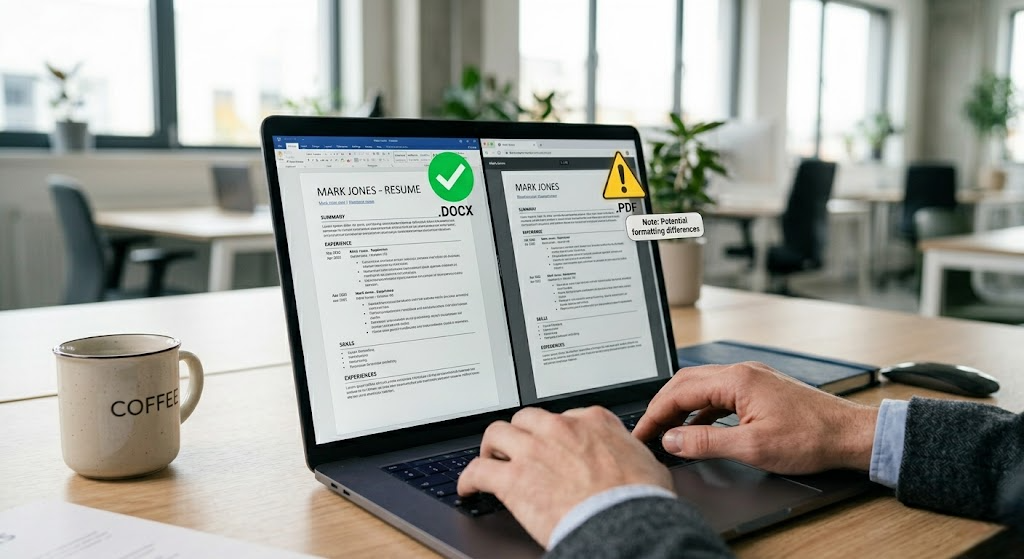
7. PDF vs Word Decision Framework — Never Guess Again
Use this framework for every application. No format guessing required.
| Application Situation | Recommended Format | Reason |
| Online ATS portal — no format specified | .docx (Word) | Maximum compatibility across all ATS platforms including legacy systems |
| Job posting explicitly requests PDF | PDF (clean, text-based from Word) | Follow instructions — but verify your PDF passes the paste test before submitting |
| Job posting explicitly requests Word | .docx (Word) | Follow instructions exactly |
| Emailing directly to a recruiter or contact | PDF (professional appearance) | No ATS involved — human review only |
| LinkedIn Easy Apply | .docx preferred | LinkedIn parses both but .docx is more reliable |
| Creative industry (design, art direction) | PDF (professionally designed) | Expected format — reviewed by humans first in most creative hiring |
| Unsure what ATS the employer uses | .docx (Word) | Eliminates all format risk by default — never penalized for Word |
| 🔥 THE GOLDEN RULE: When in doubt, submit .docx. You will never be penalized for submitting a Word document to an ATS. You can be — and frequently will be — penalized for submitting the wrong kind of PDF. The only exception is when the posting explicitly requests PDF, in which case follow the instruction and verify your PDF passes the paste test. |
8. How to Create a PDF Resume That Passes ATS
If you must submit a PDF — because the posting requires it or because you are sending directly to a person — here is the exact process to ensure it passes ATS parsing.
Even with the right format, poor keyword usage can hurt you. See 👉 [ATS resume keywords].

- Build your resume in Microsoft Word or Google Docs. Never start in a design tool. Build in single-column layout with standard system fonts (Arial, Calibri, or Times New Roman at 10–12pt). No text boxes. No tables for layout structure.
- Use tab stops — not tables — for date alignment. Tab stops preserve reading order in both .docx and PDF exports. Tables create parsing order failures.
- Export to PDF correctly. In Microsoft Word: File → Save As → PDF. Do NOT print to PDF — use the native Save As PDF function. In Google Docs: File → Download → PDF Document. Do NOT use online PDF converters or Canva’s download feature.
- Verify your PDF before submitting. Open in Adobe Reader or any browser PDF viewer. Click and drag to select text — if you cannot highlight text, the PDF is image-based and will fail all ATS. Copy a section and paste into Notepad — confirm clean text with no garbled characters.
- Check permissions settings. Adobe Reader: File → Properties → Security. Confirm ‘Content Copying: Allowed.’ If any permission is restricted, re-export without restrictions.
- Name your file correctly. Not ‘resume.pdf’ or ‘CV_final_v3.pdf.’ Use: Jane-Smith-Marketing-Manager-Resume.pdf. Clean, professional, searchable.
9. Before vs After: PDF Resume That Fails vs PDF That Passes
Same candidate — Senior Financial Analyst. Same experience. Same keywords. Different PDF creation approach and entirely different ATS outcome.
Target Keywords: financial modeling, DCF analysis, Excel (Advanced), Bloomberg Terminal, CFA, stakeholder reporting
| ✕ BEFORE — Canva PDF That Fails ATS Format: Canva PDF export, two-column layout, icons for contact details, skill ratings as progress bars, custom decorative font for headers. What ATS extracted: Scrambled column content. Contact icons read as symbol strings. Progress bar skills read as blank. Custom headers skipped — ATS cannot identify section boundaries. Keywords detected: 3 of 8 | ATS score: ~22% | ✓ AFTER — Word-Exported PDF That Passes ATS Format: PDF from Microsoft Word. Single-column. Standard Arial font. Contact in document body. Skills as plain text. No icons, tables, text boxes. Summary: Senior Financial Analyst with 7 years in investment banking. Expert in financial modeling, DCF analysis, LBO modeling, Excel (Advanced). Bloomberg Terminal proficient. CFA candidate. Keywords detected: 8 of 8 | ATS score: ~84% |
10. ATS Resume Examples by Job Title — Format Correct for PDF and .docx
Each example below works in both PDF (if exported correctly from Word) and .docx. All use single-column layouts, plain text skills, and keyword-optimized summaries. Copy, adapt, and use them directly.
| SOFTWARE ENGINEER SUMMARY: Full-Stack Software Engineer with 6 years building scalable applications using React.js, Node.js, Python, and AWS. Built high-traffic SaaS platform serving 800K monthly active users. Led microservices migration reducing API latency 42%. AWS Cloud Practitioner certified. SKILLS: JavaScript (ES6+) | Python | TypeScript | React.js | Node.js | Django | AWS (EC2, S3, Lambda) | Docker | Kubernetes | CI/CD | Jenkins | PostgreSQL | MongoDB | Redis | Agile | Scrum | TDD | REST API | Microservices | Git |
| MARKETING MANAGER SUMMARY: Marketing Manager with 7 years leading B2B and B2C demand generation across SaaS and e-commerce. Grew organic search traffic 290% over 14 months. Managed $2.1M annual media budget with 3.6× ROAS. Google Ads and HubSpot certified. SKILLS: SEO | SEM | Google Ads | Meta Ads | LinkedIn Ads | HubSpot | Marketo | Salesforce | Google Analytics 4 | Content Strategy | Email Marketing | A/B Testing | CRO | ROAS | CPL | MQL | Pipeline Attribution |
| DATA SCIENTIST SUMMARY: Data Scientist with 5 years applying machine learning and statistical modeling in fintech and healthcare. Built customer churn prediction model reducing annual churn 18% — $3.4M retained revenue. Proficient in Python (scikit-learn, TensorFlow, PyTorch), SQL, and Spark. AWS SageMaker and GCP Vertex AI certified. SKILLS: Python (scikit-learn, TensorFlow, PyTorch, Pandas) | R | SQL | AWS SageMaker | GCP Vertex AI | Databricks | Spark | Machine Learning | NLP | Deep Learning | A/B Testing | Statistical Modeling | Tableau | Power BI |
| OPERATIONS MANAGER SUMMARY: Operations Manager with 9 years optimizing supply chain, logistics, and process workflows in manufacturing and distribution. is pdf bad for ats Reduced operational costs 23% over 18 months through process redesign and vendor consolidation. Led team of 45 across 3 distribution centers. Six Sigma Black Belt certified. SKILLS: Supply Chain Management | Logistics | Process Improvement | Lean Six Sigma | SAP | Oracle ERP | NetSuite | WMS | Vendor Management | Contract Negotiation | P&L Management | Six Sigma Black Belt | PMP |
| SENIOR ACCOUNTANT / FINANCIAL ANALYST SUMMARY: Senior Accountant with 6 years managing financial reporting, tax compliance, and budget forecasting for mid-market professional services firms. Expert in GAAP, IFRS, and variance analysis. CPA certified. Reduced month-end close cycle from 12 days to 6 through process automation. is pdf bad for ats Proficient in SAP, QuickBooks Enterprise, and Excel (Advanced). SKILLS: GAAP | IFRS | Financial Reporting | Budget Forecasting | Variance Analysis | SAP | QuickBooks Enterprise | NetSuite | Sage | Excel (Advanced) | Financial Modeling | Pivot Tables | CPA | CMA | SOX Compliance |
11. ATS Keywords Strategy by Job Role
| Job Role | Priority Keyword Categories | Must-Include Terms |
| Software Engineer | Languages, frameworks, cloud, DevOps, methodology | React.js | Python | AWS | Docker | Agile | CI/CD | microservices |
| Marketing | Channels, metrics, platforms, certifications | SEO | HubSpot | Google Ads | ROAS | MQL | A/B testing | CRO |
| Data Science / ML | Languages, frameworks, cloud ML, methods | Python | TensorFlow | SQL | SageMaker | scikit-learn | NLP |
| Finance / Accounting | Standards, software, compliance, instruments | GAAP | SAP | Excel (Advanced) | CPA | Financial Modeling | SOX |
| Operations | Methodologies, ERP, compliance, scale metrics | Six Sigma | Lean | SAP | P&L | Supply Chain | ERP |
| HR Management | HRIS, compliance, programs, certifications | Workday | SHRM-CP | FMLA | EEOC | Full-Cycle Recruiting | DEI |
12. Common PDF Resume Mistakes With ATS — and the Fixes
| PDF Mistake | The Fix |
| PDF created in Canva or any design tool | Rebuild in Microsoft Word or Google Docs, then export to PDF |
| Two-column or sidebar PDF layout | Switch to strict single-column layout before PDF export |
| Cannot select text in the PDF (image-based) | Regenerate from source document using Word’s Save As PDF |
| Icons replacing text for contact info | Remove all icons — use plain text for name, email, phone, LinkedIn |
| Custom or decorative fonts | Switch to Arial, Calibri, or Times New Roman throughout |
| Skills shown as progress bars or rating icons | Replace with plain text skills list separated by pipes |
| Tables used for layout structure | Use tab stops for date alignment — not tables |
| Password-protected PDF | Re-export without restrictions — check File > Properties > Security |
| Content in headers or footers | Move all content into main document body |
| File named ‘resume.pdf’ or ‘cv_final.pdf’ | Rename: FirstName-LastName-JobTitle-Resume.pdf |
| Em dashes causing encoding errors | Replace em dashes with pipe (|) or plain hyphen |
| Smart/curly quotes in technical content | Use straight quotes — especially in code or tool names |
13. Best Tools to Test Your PDF Resume Against ATS
| Affiliate Disclosure: This article may contain affiliate links. All recommendations are based on independent testing — not commission rates. |
Jobscan — Most Reliable ATS Simulation in 2026
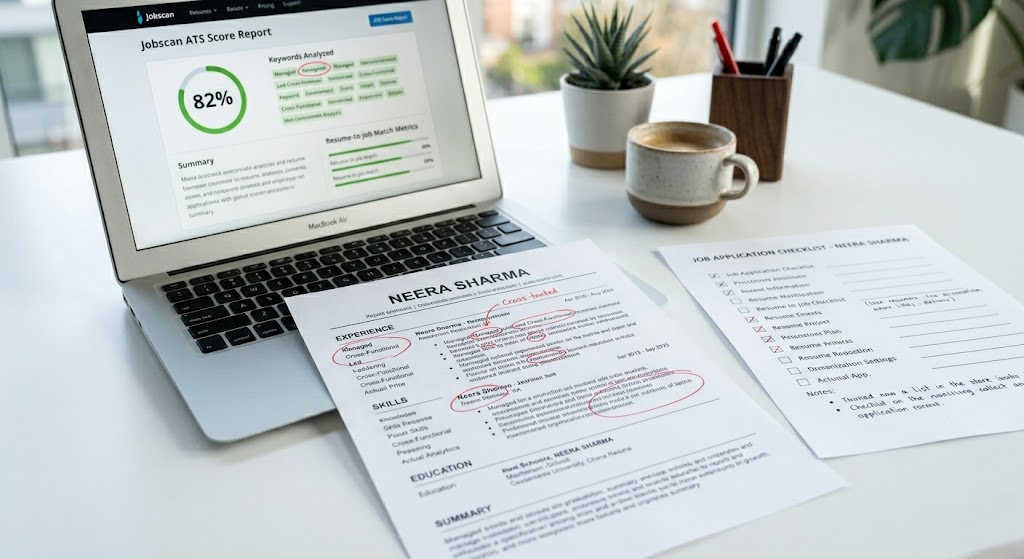
Jobscan (jobscan.co) uploads your PDF or .docx alongside any job description and provides an instant ATS match score, missing keyword report, and format issue analysis. Crucially, its extracted text view shows you exactly what the ATS sees from your PDF — the fastest way to identify whether your PDF is image-based, has table-layout problems, is pdf bad for ats or has text box content being skipped.
- Best for: Verifying both format compliance and keyword optimization before every submission
- PDF diagnostic: Shows extracted text — immediately reveals if your PDF has parsing failures
- Free tier: Available | Pro: From $49.95/month
Resume Worded — Format Compliance and Content Quality
Resume Worded (resumeworded.com) scores your resume out of 100 and flags format issues including missing sections and content extraction problems. Its section recognition check reveals whether your headings are being correctly identified — directly showing if non-standard headings are causing content to be uncategorized. is pdf bad for ats
- Best for: Improving resume content alongside format verification
- Free tier: Basic scan | Premium: From $19/month
Teal Resume Builder — ATS-Safe PDF Output Built In
Teal (tealhq.com) outputs clean, ATS-compatible .docx and PDF files pre-validated for ATS parsing. Its structure enforces single-column, standard-heading format so text box and sidebar errors are structurally impossible. Real-time keyword gap analysis as you build.
- Best for: Building a format-safe resume from scratch that outputs both .docx and clean PDF
- Free tier: Fully featured
Adobe Acrobat Reader — Free Pre-Submission PDF Verification
Before submitting any PDF: open in Adobe Acrobat Reader and try Tools → Accessibility → Full Check. This reveals whether text is selectable, reading order is logical, and whether any content is stored as images rather than text. It is free and takes two minutes.
Before submitting, always verify using this 👉 [ATS resume checklist].
14. FAQ — People Also Ask
Q: Is PDF bad for ATS resumes?
Not inherently — but it is the highest-risk format. A PDF created from a clean, single-column Word document using standard fonts is ATS-compatible on most modern platforms. A PDF from a design tool like Canva, with multi-column layout, icons, or progress bars, will fail ATS parsing on the majority of systems. When applying online through a corporate portal, is pdf bad for ats .docx is always the safer default.
Q: Can ATS read PDF resumes?
Most modern ATS platforms can read text-based PDFs generated from Word or Google Docs. However, older systems like Taleo and certain versions of iCIMS have unreliable PDF parsing. Design-tool PDFs (Canva, Illustrator, InDesign) fail on virtually all ATS platforms. The safest approach: .docx for all online applications.
Q: Should my resume be PDF or Word for ATS?
Default to .docx for all online applications submitted through a company careers portal. Use PDF when the job posting explicitly requests it, when emailing your resume directly to a human, or in creative fields where a designed PDF is expected and review is manual. Simple rule: .docx for ATS, PDF for humans.
Q: How do I make a PDF resume ATS friendly?
Build in Microsoft Word using single-column layout, standard fonts (Arial, Calibri, Times New Roman), no text boxes, and no tables for layout. is pdf bad for ats Place contact information in the main document body. Export using Word’s native Save As PDF function — not print-to-PDF and not any design tool. Verify by confirming text is selectable in the final PDF. Check permissions to ensure content copying is allowed.
Q: What is the best resume format for ATS in 2026?
.docx is the gold standard. It is universally parseable across all ATS platforms including legacy systems. A clean, text-based PDF from a Word source is a viable second option on modern ATS. Avoid: Canva PDFs, multi-column layouts, image-based PDFs, and any format using design elements to display information.
Q: How do I know if my PDF is image-based and will fail ATS?
Open your PDF in any PDF viewer (Adobe Reader, Chrome, Preview on Mac). Try to click and drag to select and highlight text. If you cannot select any text — or if selecting gives you random characters that do not match what you see — your PDF is image-based and will fail every ATS system. Regenerate it from your source document using Word’s Save As PDF function.
Q: Is a PDF from Google Docs ATS safe?
Usually yes — if your Google Docs resume uses single-column layout, standard fonts, and no design elements. Export using File → Download → PDF Document. Verify text selectability after downloading. is pdf bad for ats The main risk with Google Docs PDFs is custom fonts downloaded from Google Fonts — some of these embed as images rather than text. Stick to Arial, Calibri, or Times New Roman to avoid this.
Q: Why does ATS reject PDF resumes?
ATS does not technically ‘reject’ PDF resumes — it fails to extract content from them. When a PDF is image-based, multi-column, is pdf bad for ats permission-restricted, or created in a design tool, the parser either produces garbled text or extracts nothing. The result is a candidate record with empty fields that scores zero on keyword matching and never reaches a recruiter. is pdf bad for ats The candidate receives no rejection message — just silence.
15. Conclusion: Your Format Is the Foundation — Get It Right First
The question is not whether PDF is bad for ATS. The question is whether your specific PDF was created in a way that ATS systems can actually read.
A Canva PDF with two columns, icon-based skills, and a decorative font is invisible to most ATS systems. A clean, single-column PDF exported from Microsoft Word is readable on modern platforms. is pdf bad for ats And a .docx file eliminates the risk entirely.
Use the decision framework in Section 7 before every application. Use the nine-issue checklist in Section 6 to audit any PDF before submitting. Run every resume — PDF or Word — through Jobscan before you click submit.
If your resume still isn’t working, read 👉 [ATS resume rejected why] to find hidden issues.
| QUICK REFERENCE — PDF vs WORD DECISION Applying online through a company ATS portal? → Use .docx Posting explicitly requests PDF? → Use PDF (clean, exported from Word, paste-test verified) Emailing directly to a recruiter? → Use PDF (polished professional appearance) Not sure? → Always default to .docx. It is never wrong for ATS. |