

ATS resume template free
| QUICK ANSWER The best free ATS resume template is a single-column Word or Google Docs document with standard section headings (Professional Summary, Core Skills, Work Experience, Education, Certifications), plain text throughout, and zero graphics. The complete copy-paste version with real content is in Section 3 of this guide — you can fill in your own details and be ready to submit in under 30 minutes. |
| 📢 Transparency note: This article mentions several resume tools including Jobscan, Resume Worded, and Teal. Some links may be affiliate links — if you purchase through them, we may earn a small commission at no cost to you. All opinions are based on independent testing. We only mention tools we’ve actually used. |
You searched for a free ATS resume template because you need something that actually works — not another beautiful design that gets silently filtered out before a recruiter lays eyes on it.
Here’s the situation most job seekers face: they spend time building what looks like a polished, professional resume, submit it through an online portal, and hear nothing. Not a rejection. Just silence. The resume never reached a human.
| ⚠️ 97.8% of Fortune 500 companies now use ATS software to screen resumes before human review. Approximately 75% of applications are rejected by the system before a recruiter sees them — typically because of formatting errors, missing keywords, or both. A properly structured free ATS resume template eliminates the first problem before it starts. |
This guide gives you the free ATS resume template itself — a complete, ready-to-use version with real content examples — plus the strategy, keyword placement map, customisation workflow, and recruiter insights that turn the template into actual interviews.
Everything you need is on this page. Let’s start with the template.
What Is a Free ATS Resume Template — and Why Most Fail ATS Scanning
An ATS resume template free of graphics, columns, and formatting gimmicks is a document structure designed to survive automated screening before it reaches a human. It’s not about looking good. It’s about being readable.
Here’s how ATS systems process your file. When you submit a resume online, the system converts your document to raw text, extracts structured fields (name, job titles, skills, education), compares those fields to the job description’s keyword filter, and ranks you against every other applicant. Your resume never looks ‘designed’ to the ATS — it looks like a stream of text. What matters is whether that stream of text contains the right information in the right places.
The Two Ways a Resume Template Fails ATS
| Failure Type | What Causes It | What the ATS Sees |
| Format Failure | Two-column layout, text boxes, Canva export, graphics, Word header/footer contact info | Scrambled or empty text. Your qualifications don’t register at all. |
| Keyword Failure | Wrong language, generic descriptions, abbreviations without full forms, missing required skills | Text is readable but scores low. You don’t rank high enough to appear in recruiter searches. |
A free ATS resume template solves format failure before you write a single word. Keyword optimisation — the tailoring process — solves the second problem for each specific job. Both are necessary. The template handles the first.
What a Properly Structured ATS Resume Template Contains
- Single-column layout — no sidebars, no skills column, no divided sections
- Contact information in the main document body — never in a Word header or footer
- Standard section headings — Professional Summary, Core Skills, Work Experience, Education, Certifications
- Plain text throughout — no icons, skill bars, graphics, photos, or decorative borders
- Consistent date formatting — January 2022 – March 2025 or 01/2022 – 03/2025
- Standard fonts — Arial, Calibri, Georgia, or Times New Roman at 11–12pt
- File saved as .docx — unless the posting specifically requires PDF
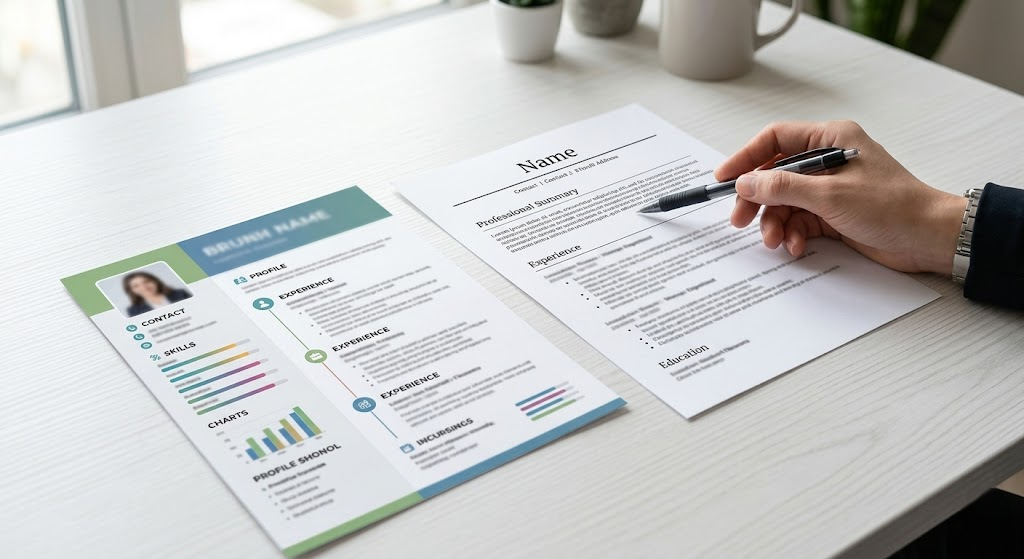
Why Canva, Graphic, and Two-Column Templates Fail ATS — and This Free ATS Resume Template Doesn’t
This is the explanation missing from almost every other guide on this topic. It’s not enough to say ‘Canva fails ATS.’ You need to understand the mechanism — because understanding it explains exactly why a clean free ATS resume template is worth using over any designed alternative.
What Canva Resumes Look Like to an ATS Parser
Canva exports resumes as image-based PDFs or graphics-heavy files. When an ATS receives an image PDF, it sees a photograph of a resume — not text it can read. The parser has no text to extract. Your name, your experience, your skills — all invisible. The ATS scores you zero.
Even Canva’s so-called ‘ATS-friendly’ templates are rarely tested against real systems like Greenhouse, Workday, or iCIMS. A template with a subtle two-column layout, a skills sidebar, or decorative section dividers will still fail most enterprise ATS parsers.
What a Two-Column Template Looks Like After Parsing
This is the actual text output when a typical two-column resume is submitted to an ATS parser. The system reads left-to-right across the full page width, then moves to the next line — so it interleaves column A and column B:
| SCRAMBLED OUTPUT — Two-Column Template: |
| Alex Morgan | SEO Content Strategy Analytics |
| Chicago, IL | HubSpot Salesforce Google Ads |
| (312) 555-0198 | Email Marketing A/B Testing |
| DIGITAL MARKETING MANAGER | EDUCATION |
| Nexus SaaS Inc Jan 2022–Present | University of Michigan BSc Marketing 2021 |
| Led campaigns for… | GPA 3.7 |
The ATS now has no idea what is a job title, what is a skill, and what is a date. Your contact information has merged with your skills. Your employer name is next to your GPA. The system scores this near zero.
| CLEAN OUTPUT — Free ATS Resume Template (Single Column): |
| Alex Morgan |
| Chicago, IL | (312) 555-0198 | alex.morgan@email.com |
| linkedin.com/in/alexmorgan |
| PROFESSIONAL SUMMARY |
| Digital Marketing Manager with 5 years of experience… |
| CORE SKILLS |
| SEO, Content Strategy, Google Analytics 4, HubSpot, Salesforce… |
| WORK EXPERIENCE |
| Digital Marketing Manager | Nexus SaaS Inc | Chicago, IL | Jan 2022–Present |
| • Led demand generation campaigns across Google Ads and LinkedIn… |
| ✅ The free ATS resume template in Section 3 produces the second output — not the first. Every field is in the right place. Every section is correctly labelled. The parser reads it the same way a human would. That’s the entire point. |
The Comparison You Need to See
| Factor | Canva Template | Two-Column Template | Free ATS Resume Template |
| ATS Parse Rate | Very low (image-based) | Low (scrambled columns) | High (clean linear text) |
| Keyword Extraction | Fails — text not readable | Partial — sections merge | Full — all sections parsed |
| Contact Info Safety | Often in image header | Risk if in column sidebar | In body — always safe |
| Recruiter Readability | Good (if human sees it) | Moderate | Excellent |
| ATS Compatibility | Fails Greenhouse, Workday | Risky on most enterprise ATS | Works on all major ATS |
| Cost | Free (but costs interviews) | Free (but risky) | Free (and safe) |

Free ATS Resume Template — Complete Copy-Paste Version
This is the free ATS resume template you can copy right now. It’s formatted for ATS parsing, uses standard section headings, and includes real content examples you can adapt. Every section is annotated so you know exactly what to replace.
| 📋 Instructions How to use this template: copy the entire block below into a plain Microsoft Word or Google Docs document. Replace the example content with your own. Save as FirstName-LastName-RoleTitle-2026.docx. Do not add images, skill bars, columns, or decorative elements. |
| ━━━━━━━━━━━━━━━━━━━━━━━━━━━━━━━━━━━━━━━━━━━━━━━━━━━━━━ |
| SECTION 1: HEADER — Replace with your information |
| ━━━━━━━━━━━━━━━━━━━━━━━━━━━━━━━━━━━━━━━━━━━━━━━━━━━━━━ |
| [YOUR FULL NAME] |
| [City, State/Country] | [Phone] | [Email Address] |
| [LinkedIn URL] | [Portfolio URL if applicable] |
| ━━━━━━━━━━━━━━━━━━━━━━━━━━━━━━━━━━━━━━━━━━━━━━━━━━━━━━ |
| SECTION 2: PROFESSIONAL SUMMARY — 3–4 sentences |
| Keyword placement: job title + top 3 skills + years + value |
| ━━━━━━━━━━━━━━━━━━━━━━━━━━━━━━━━━━━━━━━━━━━━━━━━━━━━━━ |
| PROFESSIONAL SUMMARY |
| [Job Title] with [X] years of experience in [primary function] |
| for [industry/company type]. Proficient in [Tool 1], [Tool 2], |
| and [Tool 3]. [Achievement or value statement]. [Availability |
| or location note if applicable]. |
| EXAMPLE: |
| Digital Marketing Manager with 5 years of experience scaling |
| organic and paid growth for B2B SaaS companies. Proficient in |
| Google Analytics 4, HubSpot, and Salesforce CRM. Delivered 60% |
| organic traffic growth and a 28% reduction in cost-per-lead. |
| Available for remote and hybrid roles in the US and UK. |
| ━━━━━━━━━━━━━━━━━━━━━━━━━━━━━━━━━━━━━━━━━━━━━━━━━━━━━━ |
| SECTION 3: CORE SKILLS — Categorised, plain text |
| Keyword placement: match job description terms exactly |
| ━━━━━━━━━━━━━━━━━━━━━━━━━━━━━━━━━━━━━━━━━━━━━━━━━━━━━━ |
| CORE SKILLS |
| [Category 1]: [Skill 1], [Skill 2], [Skill 3], [Tool Name], |
| [Tool Name], [Certification if relevant] |
| [Category 2]: [Skill 1], [Skill 2], [Software Name] |
| [Category 3]: [Soft Skill 1], [Soft Skill 2], [Competency] |
| EXAMPLE: |
| Marketing: SEO, SEM, content marketing, email marketing, |
| Google Analytics 4, HubSpot, Salesforce, Hootsuite, |
| A/B testing, demand generation, paid social |
| Technical: Microsoft Office Suite, Google Workspace, Canva, |
| Tableau (basic), HTML (basic) |
| Soft Skills: written communication, stakeholder management, |
| project coordination, cross-functional collaboration |
| ━━━━━━━━━━━━━━━━━━━━━━━━━━━━━━━━━━━━━━━━━━━━━━━━━━━━━━ |
| SECTION 4: WORK EXPERIENCE — Reverse chronological |
| Format: Job Title | Company | Location | Start – End |
| ━━━━━━━━━━━━━━━━━━━━━━━━━━━━━━━━━━━━━━━━━━━━━━━━━━━━━━ |
| WORK EXPERIENCE |
| [Job Title] | [Company Name] | [City, State] | [Month Year] – [Month Year] |
| • [Action verb] + [what you did] + [tool/platform used] + |
| [quantified outcome — % / $ / time / volume] |
| • [Action verb] + [responsibility or project] + [metric] |
| • [Action verb] + [collaboration context or team size] |
| • [Action verb] + [process improvement or initiative] + [result] |
| EXAMPLE: |
| Digital Marketing Manager | Nexus SaaS Inc | Chicago, IL | Jan 2022–Present |
| • Led end-to-end demand generation campaigns across Google Ads |
| and LinkedIn, increasing marketing-qualified leads by 43% YoY |
| • Managed $180K monthly ad budget with a 28% reduction in cost- |
| per-lead through bid strategy optimisation and audience testing |
| • Built weekly dashboards in Looker Studio and Google Analytics 4, |
| delivering performance insights to VP Marketing and C-suite |
| • Developed 40+ SEO-optimised blog posts via HubSpot CMS, driving |
| 12,000+ monthly organic visits within 90 days of publication |
| [Second Role — same format] |
| ━━━━━━━━━━━━━━━━━━━━━━━━━━━━━━━━━━━━━━━━━━━━━━━━━━━━━━ |
| SECTION 5: EDUCATION |
| ━━━━━━━━━━━━━━━━━━━━━━━━━━━━━━━━━━━━━━━━━━━━━━━━━━━━━━ |
| EDUCATION |
| [Degree in Full] — [Major] |
| [University Name], [City, State] | [Month Year] |
| [GPA if 3.5+] | Relevant Coursework: [Course 1], [Course 2] |
| EXAMPLE: |
| Bachelor of Science in Marketing |
| University of Michigan, Ann Arbor, MI | May 2021 |
| GPA: 3.7/4.0 | Relevant Coursework: Digital Marketing, Consumer Analytics |
| ━━━━━━━━━━━━━━━━━━━━━━━━━━━━━━━━━━━━━━━━━━━━━━━━━━━━━━ |
| SECTION 6: CERTIFICATIONS |
| ━━━━━━━━━━━━━━━━━━━━━━━━━━━━━━━━━━━━━━━━━━━━━━━━━━━━━━ |
| CERTIFICATIONS |
| [Certification Full Name (ABBREVIATION)] — [Issuer], [Year] |
| [Certification Full Name (ABBREVIATION)] — [Issuer], [Year] |
| EXAMPLE: |
| Google Analytics 4 Certification — Google, 2025 |
| HubSpot Content Marketing Certification — HubSpot Academy, 2025 |
| Project Management Professional (PMP) — PMI, 2024 |
| ━━━━━━━━━━━━━━━━━━━━━━━━━━━━━━━━━━━━━━━━━━━━━━━━━━━━━━ |
| [ END OF FREE ATS RESUME TEMPLATE ] |
| Download the formatted .docx version — see Section 10. |
| 📥 Download Free ATS Resume Template Download CTA: The fully formatted, ready-to-edit version of this free ATS resume template in Word (.docx) format is available as a separate download file alongside this article. Open it in Microsoft Word or upload to Google Docs, then replace the example content with your own. No sign-up required. |
Free ATS Resume Template: What It Looks Like in Real Use
Here’s a fully completed version of the free ATS resume template — using the marketing manager profile — so you can see exactly how the sections connect and what level of detail works at each level.
| ALEX MORGAN |
| Chicago, IL | (312) 555-0198 | alex.morgan@email.com |
| linkedin.com/in/alexmorgan |
| PROFESSIONAL SUMMARY |
| Digital Marketing Manager with 5 years of experience scaling organic and |
| paid acquisition for B2B SaaS companies in the US and UK markets. Expert |
| in Google Analytics 4, HubSpot CRM, Salesforce, and demand generation |
| strategy. Delivered 60%+ organic traffic growth and 28% CPL reduction across |
| multiple product lines. Available for senior marketing roles in remote and |
| hybrid environments. |
| CORE SKILLS |
| Marketing: SEO, SEM, demand generation, content marketing, email |
| marketing, A/B testing, account-based marketing (ABM), |
| Google Analytics 4, HubSpot, Salesforce, Hootsuite |
| Technical: Looker Studio, Microsoft Office Suite, Google Workspace, |
| HTML (basic), Canva, Tableau (basic) |
| Soft Skills: stakeholder communication, cross-functional collaboration, |
| project coordination, written reporting, data analysis |
| WORK EXPERIENCE |
| Digital Marketing Manager | Nexus SaaS Inc | Chicago, IL Jan 2022–Present |
| • Led end-to-end demand generation strategy across Google Ads and |
| LinkedIn Ads, growing marketing-qualified leads (MQL) by 43% YoY |
| • Managed $180K monthly digital ad spend, reducing cost-per-lead (CPL) |
| by 28% through bid optimisation, audience segmentation, and creative |
| testing across 12 campaign variants |
| • Built and maintained weekly performance dashboards in Looker Studio |
| and Google Analytics 4, presenting insights monthly to VP Marketing |
| • Developed and published 40+ SEO-optimised articles via HubSpot CMS, |
| driving 12,000+ monthly organic visits within 90 days |
| • Coordinated with distributed content and design teams across 3 time |
| zones via Asana and Slack, delivering all campaigns on schedule |
| Marketing Coordinator | Brightline Agency | Remote Jun 2021–Jan 2022 |
| • Coordinated digital campaigns for 8 B2B clients using Asana and |
| HubSpot, delivering weekly status reports to account managers |
| • Analysed campaign performance in Google Analytics and Salesforce, |
| identifying a content gap that added 8,000 monthly visits |
| • Grew combined client social following by 18% over 9 months via a |
| structured Hootsuite content calendar strategy |
| EDUCATION |
| Bachelor of Science in Marketing |
| University of Michigan, Ann Arbor, MI | Graduated May 2021 |
| GPA: 3.7/4.0 | Coursework: Digital Marketing, Consumer Analytics |
| CERTIFICATIONS |
| Google Analytics 4 Certification — Google, 2025 |
| HubSpot Content Marketing Certification — HubSpot Academy, 2025 |
| Meta Blueprint Digital Marketing Associate — Meta, 2024 |
Notice what makes this completed version work for ATS: every tool is named specifically, every bullet has at least one metric, the summary contains the exact job title and top keywords, and the skills section is categorised. Nothing is in a table, text box, or column. This is what ATS-readable text looks like.
How to Customise the Free ATS Resume Template for Any Job
Getting the free ATS resume template is step one. Customising it for each specific job is what actually gets you the interview. Here’s the exact workflow.
The 10-Minute Tailoring Workflow
- Open the job description in one window and your free ATS resume template in another.
- Identify every Required skill or qualification in the posting. These are non-negotiable — if you have the skill, it must appear in your resume.
- Identify every Preferred skill. Add these if they genuinely match your experience.
- Note every tool or platform named. Add the exact name to your skills section.
- Update the first sentence of your professional summary to include the exact job title from the posting.
- Reorder your top 3–5 Core Skills to match the order the job description emphasises them.
- Check each experience bullet — add any missing keywords where they appear naturally and accurately.
- Run a keyword match check (Jobscan or similar) to see your score. Target 75%+.
- Save as FirstName-LastName-CompanyName-RoleTitle-2026.docx.
- Submit.
Base Template vs Tailored Version — Side by Side
| Base Template Summary | Tailored for ‘Senior Digital Marketing Manager’ role |
| Digital Marketing Manager with 5 years of experience scaling B2B SaaS brands. Expert in Google Analytics 4, HubSpot, and Salesforce. Delivered 60% organic traffic growth. | Senior Digital Marketing Manager with 5 years of demand generation and account-based marketing (ABM) experience for B2B SaaS companies. Expert in Google Analytics 4, HubSpot, Marketo, and Salesforce CRM. Delivered 60%+ organic growth and 28% CPL reduction. Available for remote or hybrid senior marketing roles. |
In the tailored version: ‘Senior Digital Marketing Manager’ matches the exact posting title. ‘Demand generation’ and ‘account-based marketing (ABM)’ and ‘Marketo’ all appear in the job description but were missing from the base version. Those additions are what move a score from 61% to 83%.
ATS Keywords Strategy: Where Every Keyword Belongs in Your Free ATS Resume Template
Knowing which keywords to include is only half the problem. Knowing exactly where in your free ATS resume template each keyword type belongs is what determines your ATS score.
| Keyword Type | Where It Goes | Example |
| Job title | Professional Summary (sentence 1) + most recent role heading | ‘Senior Digital Marketing Manager’ in summary opening line AND as the title of your current role |
| Tool/platform names | Core Skills section + experience bullets | ‘HubSpot’ in skills list AND ‘Managed campaigns using HubSpot’ in bullet |
| Required skills | Core Skills (first) + experience bullets (context) | ‘demand generation’ in skills AND ‘Led demand generation strategy…’ in experience |
| Certification names | Certifications section (full name + abbreviation) | ‘Project Management Professional (PMP)’ — both forms in certifications section |
| Soft skills | Professional Summary (1–2) + Core Skills (category) | ‘stakeholder management’ in summary AND in soft skills category |
| Industry/function terms | Summary + relevant experience bullets | ‘B2B SaaS’ in summary AND ‘grew B2B client pipeline by…’ in experience |
| 💡 The context rule: every important keyword should appear at least twice. Once in your Core Skills section — for clean ATS extraction. Once in an experience bullet — for context scoring. Modern ATS systems including Greenhouse and newer Workday versions now weight contextual keyword use more heavily than simple keyword presence. |
The Full/Abbreviated Form Rule
Write every certification, acronym, and key term in both forms — once. After that, use whichever form fits the sentence naturally.
- ‘Search Engine Optimisation (SEO)’ — write this once. Then use ‘SEO’ freely.
- ‘Account-Based Marketing (ABM)’ — write once in full. Then ‘ABM’ in bullets.
- ‘Project Management Professional (PMP)’ — always in full in the certifications section.
- ‘Human Resources Information System (HRIS)’ — full form the first time it appears.
This approach satisfies ATS filters searching for either form. It’s one of the highest-return, lowest-effort changes you can make to any resume.
Common ATS Resume Mistakes — and How to Fix Them
These mistakes appear consistently on resumes that fail ATS screening. Every one is fixable.
Mistake 1: Contact Information in a Word Header
❌ Name, phone, and email in the document header or footer
✅ All contact information in the first 3 lines of the main document body — outside any header element
Why it matters: most ATS parsers skip Word header and footer content entirely. If your name and email are in the header, the system may have no idea who submitted the resume.
Mistake 2: Using Generic Tool Descriptions
❌ Experienced with analytics software and project management platforms
✅ Proficient in Google Analytics 4, Looker Studio, Jira, and Asana
Why it matters: ATS systems filter for exact tool names. ‘Analytics software’ matches nothing. ‘Google Analytics 4’ matches the keyword the recruiter programmed.
Mistake 3: Skill Bars and Visual Ratings
❌ Python ●●●●○ | JavaScript ●●●○○ | Leadership ●●●●●
✅ Python (5 years), JavaScript (3 years) — listed as plain text in skills section
Why it matters: skill bar graphics are images. ATS parsers can’t read images. Your five-star Python rating extracts as nothing.
Mistake 4: Duties-Only Bullets
❌ Responsible for managing digital campaigns and reporting on performance
✅ Led $180K monthly Google Ads and LinkedIn campaign portfolio, reducing cost-per-lead by 28% over 12 months
Why it matters: duties-only bullets don’t contain metrics or specific tool names — both of which boost ATS scores. A quantified bullet with a named tool is worth three generic bullets.
Mistake 5: Identical Resume for Every Application
❌ Sending the same .docx to every employer without changing the summary or skills
✅ 10–15 minutes of tailoring per application: update summary with exact job title, reorder skills to match JD priority, add missing required keywords
Why it matters: every job description has a different keyword set. The same resume might score 84% at Company A and 48% at Company B for what looks like the same role — because the language differs.
Mistake 6: Abbreviations Without Full Forms
❌ Experienced in ABA, ABM, CRO, NPS, CSAT, and FMLA compliance
✅ Account-Based Marketing (ABM), Conversion Rate Optimisation (CRO), Customer Satisfaction (CSAT) — first use in full, then abbreviated
Why it matters: ATS keyword filters may search for either the full form or the abbreviation. Writing both captures both searches.
Pro Tips from Recruiters: What They See After ATS Filters
Most resume guides end at ‘pass the ATS.’ This section covers what happens next — because the human recruiter who reads your resume after ATS is equally important.
What Recruiters Actually Look for in 30 Seconds
A recruiter reading a shortlisted resume makes a first decision in 6–10 seconds. Here’s what they scan in that window:
- Your most recent job title — does it match what they’re hiring for?
- Your most recent employer — is it a recognisable company or relevant industry?
- Your first bullet point in the most recent role — does it start with a strong action verb and include a metric?
- Your skills section — does it contain the tools and systems they need?
- How long you’ve been in your current role — does the tenure make sense?
| 💡 This is why your most important keywords should appear in the top third of your resume — not buried in an older role. The ATS scores your entire document. The recruiter scans the top. Both matter. Both need to work. |
The File Naming Rule Recruiters Notice
When a recruiter opens your resume from the ATS database, they often see the filename first. Here’s what different filenames communicate:
❌ CV.pdf, Resume_final_v3.docx, MyResume_updated.pdf
✅ Alex-Morgan-Senior-Marketing-Manager-2026.docx
The named file tells the recruiter you’re organised and intentional. It also makes it easier for them to find your specific application in a folder of 50 downloaded resumes.
How to Optimize a Resume for Greenhouse ATS
Three Things Recruiters Penalise Immediately
- ‘References available upon request’ — wastes a line. Removes it. Everyone knows references exist.
- An ‘objective statement’ that only describes what you want — instead of what you offer. Replace with a keyword-rich professional summary.
- Unexplained employment gaps — not penalised if there’s a one-line explanation. Only penalised if silently absent with confusing dates.
Recommended Tools to Check Your Free ATS Resume Template Score
Once your free ATS resume template is filled in and tailored, run it through one of these tools before submitting. They identify keyword gaps and format issues you may have missed.
ATS Resume for Students With No Work Experience
| Tool | Best For | Free Option | What It Checks |
| Jobscan | Keyword gap vs job description | 5 scans/month | Matches your resume keywords against the specific job posting. Most accurate simulation of named ATS platforms (Greenhouse, Workday, iCIMS). |
| Resume Worded | Bullet quality + writing | Limited free tier | Scores bullet point strength — action verbs, quantification, keyword density. Best for improving writing quality. |
| Teal | Multi-application workflow | Generous free plan | ATS score + job application tracker. Best if you’re managing 10+ active applications and need version control. |
| Plain Text Test | Format validation | 100% free | Copy all resume text into Notepad. If it reads top to bottom in logical order, your format is ATS-safe. Takes 30 seconds. |
| ⚠️ Honest caveat: none of these tools replicate a real ATS exactly. They’re diagnostic simulators — useful for catching keyword gaps and format problems before you submit. A Jobscan score of 78% doesn’t guarantee you’ll rank first in Workday. It means you’ve done the optimisation homework. Use the tools as preparation, not as guarantees. |
Frequently Asked Questions
| Q: Is this free ATS resume template really free to use? |
| Yes, completely. The copy-paste template in Section 3 is free to use right now with no sign-up required. The downloadable .docx version is also free. You own your resume and can use it however you like. No watermarks, no locked sections, no premium version required for the template itself. |
| Q: Should I save my ATS resume template as PDF or Word? |
| Save as .docx (Word format) for most applications. It has the highest parsing success rate across Greenhouse, Lever, Workday, iCIMS, and Taleo. Only save as PDF if the job posting specifically requests it — and if you do, make sure it’s a text-based PDF exported from Word or Google Docs, never a Canva export or scanned image. |
| Q: How many keywords should I add to my free ATS resume template? |
| Aim for 15–25 keywords from the specific job description you’re applying to, placed naturally across your summary, skills section, and experience bullets. Write both full and abbreviated forms for key terms. Don’t copy every word from this guide into your resume — only include keywords that match your genuine experience. |
| Q: Can I use the same free ATS resume template for every job application? |
| Use it as a base, but tailor it for every application. The template’s structure and formatting stay the same. What changes: your professional summary (update with the exact job title), your Core Skills section (reorder to match the job description’s priority), and specific keywords in your experience bullets. This takes 10–15 minutes per application. |
| Q: Does this free ATS resume template work for the UK as well as the US? |
| Yes, with minor adjustments. In the UK, the document is called a CV (not a resume) and is typically 2 pages. Use British English spelling (optimise, analyse, programme). Omit date of birth, nationality, and photo. The single-column format and standard section headings work identically with UK ATS platforms including Eploy, Jobtrain, and Trac.jobs. |
Your Complete Action Plan
Here’s exactly what to do with this free ATS resume template right now.
✔ Copy the template from Section 3 into a blank Word or Google Docs document
✔ Replace the example content with your own — header, summary, skills, experience, education, certifications
✔ Open a job description you’re applying for. Update your summary with that exact job title.
✔ Check your skills section against the job description — add missing tool names and required keywords
✔ Run the plain-text test (paste into Notepad) to confirm your format parses correctly
✔ Run Jobscan against the specific job description — target 75%+ keyword match
✔ Save as FirstName-LastName-RoleTitle-Company-2026.docx
✔ Submit with confidence
| ✅ The free ATS resume template in this guide is not a magic solution. It’s a correctly structured starting point that removes format failure as a reason for rejection — so your actual qualifications get a fair chance to score. Tailoring the content for each job is what moves you from a fair chance to a strong one. |
A free ATS resume template that works isn’t about removing your personality or flattening your experience. It’s about presenting what you’ve actually done in the format that gets it read.
You have the template. You have the strategy. Now apply it.
Sources Referenced
Jobscan ATS Research • SHRM Talent Acquisition Data • U.S. Bureau of Labor Statistics • LinkedIn Talent Solutions • Harvard Business Review hiring systems research • Greenhouse, Lever, Workday, iCIMS, Taleo platform documentation • NACE Career Readiness Framework